<?xml version="1.0" encoding="utf-8"?>
<feed xmlns="http://www.w3.org/2005/Atom">
    <title>外部変形を考える</title>
    <link rel="alternate" type="text/html" href="http://www.tmk-s.com/gaihen/" />
    <link rel="self" type="application/atom+xml" href="http://www.tmk-s.com/gaihen/atom.xml" />
   <id>tag:www.tmk-s.com,2007:/gaihen//4</id>
    <link rel="service.post" type="application/atom+xml" href="http://www.tmk-s.com/blog/mt/mt-atom.cgi/weblog/blog_id=4" title="外部変形を考える" />
    <updated>2007-01-06T08:35:50Z</updated>
    <subtitle>Jw_cadの外部変形って難しい。</subtitle>
    <generator uri="http://www.sixapart.com/movabletype/">Movable Type  3.2-ja-2</generator>
 
<entry>
    <title>アドレス変更</title>
    <link rel="alternate" type="text/html" href="http://www.tmk-s.com/gaihen/2007/01/post_22.html" />
    <link rel="service.edit" type="application/atom+xml" href="http://www.tmk-s.com/blog/mt/mt-atom.cgi/weblog/blog_id=4/entry_id=224" title="アドレス変更" />
    <id>tag:www.tmk-s.com,2007:/gaihen//4.224</id>
    
    <published>2007-01-06T08:22:42Z</published>
    <updated>2007-01-06T08:35:50Z</updated>
    
    <summary>お知らせ 「外部変形を考える」サイト閲覧ありがとうございます。 当サイトは、20...</summary>
    <author>
        <name>marusan</name>
        
    </author>
            <category term="050おしらせ" />
    
    <content type="html" xml:lang="ja" xml:base="http://www.tmk-s.com/gaihen/">
        <![CDATA[<font color=#ff0000 size=5>お知らせ</font>

「外部変形を考える」サイト閲覧ありがとうございます。
当サイトは、2005年04月04日からblog.livedoor.jpで立ち上げ、2006年01月29日にMovable Type に変更して来ましたが、このたびシステムをSerene Bachに変更いたします。
よって、アドレスが変更になります。

新しいアドレス
<a href="http://www.tmk-s.com/gaihen2/sb/">http://www.tmk-s.com/gaihen2/sb/</a>

このページはしばらくの間は閲覧用として残ります。
しかし、コメント、トラックバックは出来ませんし、更新も有りません。

これからも「外部変形を考える」をよろしくお願い致します。

]]>
        
    </content>
</entry>
<entry>
    <title>雲マーク外変</title>
    <link rel="alternate" type="text/html" href="http://www.tmk-s.com/gaihen/2006/11/post_20.html" />
    <link rel="service.edit" type="application/atom+xml" href="http://www.tmk-s.com/blog/mt/mt-atom.cgi/weblog/blog_id=4/entry_id=222" title="雲マーク外変" />
    <id>tag:www.tmk-s.com,2006:/gaihen//4.222</id>
    
    <published>2006-11-18T01:44:59Z</published>
    <updated>2006-11-18T01:50:05Z</updated>
    
    <summary>釘宮 秀敏氏作『jww雲すけ』 ・ホームページ ・ベクターサイト Ｍ．Ｈａｙａｓ...</summary>
    <author>
        <name>marusan</name>
        
    </author>
    
    <content type="html" xml:lang="ja" xml:base="http://www.tmk-s.com/gaihen/">
        <![CDATA[釘宮 秀敏氏作『jww雲すけ』
<a href="http://homepage2.nifty.com/yorozuya_kugimiya/">・ホームページ</a>
<a href="http://www.vector.co.jp/soft/win95/business/se284443.html">・ベクターサイト</a>

Ｍ．Ｈａｙａｓｈｉ氏作『雲雲』
<a href="http://f884leap.yh.land.to/">・ホームページ</a>
<a href="http://www.vector.co.jp/soft/win95/business/se241957.html">・ベクターサイト</a>

等など有りますが、杉井 左内氏（Gnomonさん）作の『雲囲い』を紹介します。
<a href="http://www.vector.co.jp/soft/win95/business/se414430.html">http://www.vector.co.jp/soft/win95/business/se414430.html</a>

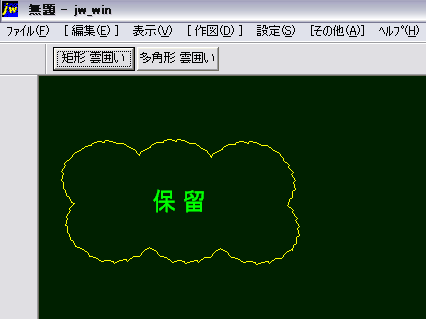
矩形雲囲いと任意の多角形雲囲いが選択出来ます。
また、雲囲いされた中に自動でコメント文字は入ります。
作図されるデータのレイヤや線色線種・形・コメント文の設定は、AWKファイルに詳しく説明が載ってます。

<img alt="kumo.png" src="http://www.tmk-s.com/gaihen/img/kumo.png" width="426" height="319" />]]>
        
    </content>
</entry>
<entry>
    <title>気になる外変</title>
    <link rel="alternate" type="text/html" href="http://www.tmk-s.com/gaihen/2006/10/post_19.html" />
    <link rel="service.edit" type="application/atom+xml" href="http://www.tmk-s.com/blog/mt/mt-atom.cgi/weblog/blog_id=4/entry_id=221" title="気になる外変" />
    <id>tag:www.tmk-s.com,2006:/gaihen//4.221</id>
    
    <published>2006-10-24T09:59:10Z</published>
    <updated>2006-10-24T10:03:07Z</updated>
    
    <summary> 関崎建築設計事務所（H.N）rsaさんのサイトで、馬目さん、sugiさん、JB...</summary>
    <author>
        <name>marusan</name>
        
    </author>
            <category term="020外変紹介" />
    
    <content type="html" xml:lang="ja" xml:base="http://www.tmk-s.com/gaihen/">
        <![CDATA[
関崎建築設計事務所（H.N）rsaさんのサイトで、馬目さん、sugiさん、JBAさん、お三方の外部変形が紹介されてます。

rsaさんは、個人的にもお付き合いさせてもらっている方ですが・・
「わしは、外変は良く解らん！」って言ってた人が、あそこまで丁寧に詳しく説明されてるとは頭が下がります。

紹介されている外変は、rsaさんが個人的に作ってもらった物らしいですが、大変便利な外変ですので一見の利は大いに有ると思います。
私もいろんな意味で気になる外変なのですが・・・ＤＬするのは簡単ですが、触っている時間が無い現状況です。
ごめんなさい。


◆ <a href="http://homepage3.nifty.com/rsa/index.htm" target="_blank">関崎建築設計事務所さんのサイトトップ</a>
　　　∟<a href="http://homepage3.nifty.com/rsa/08_professional/03_jww/01_jww/gaihenn.html" target="_blank">いただき物外部変形のページ</a>

　○ <a href="http://homepage3.nifty.com/Y_MANOME/" target="_blank">馬目さんのサイト</a>
　○ <a href="http://homepage2.nifty.com/igus/" target="_blank">sugiさんのサイト</a>
　○ <a href="http://jba52.com/" target="_blank">JBAさんのサイト</a>
]]>
        
    </content>
</entry>
<entry>
    <title>REM #cdって何？</title>
    <link rel="alternate" type="text/html" href="http://www.tmk-s.com/gaihen/2006/10/rem_cd.html" />
    <link rel="service.edit" type="application/atom+xml" href="http://www.tmk-s.com/blog/mt/mt-atom.cgi/weblog/blog_id=4/entry_id=146" title="REM #cdって何？" />
    <id>tag:www.tmk-s.com,2006:/gaihen//4.146</id>
    
    <published>2006-10-05T01:27:54Z</published>
    <updated>2006-10-12T05:43:34Z</updated>
    
    <summary>「外部変形をダウンロードしたけど動かない」という質問の回答に良く出てくる －－－...</summary>
    <author>
        <name>marusan</name>
        
    </author>
            <category term="028マメヒント" />
    
    <content type="html" xml:lang="ja" xml:base="http://www.tmk-s.com/gaihen/">
        <![CDATA[「外部変形をダウンロードしたけど動かない」という質問の回答に良く出てくる

－－－－－－－－－－－－
REM #jw
REM #cd　　<font color=#ff0000>&lt;-ここを追加</font>
REM #hm
－－－－－－－－－－－－

と、いうふうにBATファイルに「REM #cd」を書き加えて下さい。ってのが有りますよね。
これは何？？　と、疑問に思った事ありませんか？]]>
        <![CDATA[私も他所様の所から見たり聞いたりの事しか分かりませんが、間違っていたら指摘して下さい。


<strong>１）REM #cdの意味</strong>
外部変形を実行する時、BATファイルが有る<a href="http://e-words.jp/w/E38387E382A3E383ACE382AFE38388E383AA.html">ディレクトリ</a>（フォルダ）を<a href="http://e-words.jp/w/E382ABE383ACE383B3E38388E38387E382A3E383ACE382AFE38388E383AA.html">カレント</a>にする。
直接の意味は、こうゆう事です。

<strong>２）BATファイルが有るディレクトリをカレントにするって？</strong>
<a href="http://www.tmk-s.com/gaihen/2006/02/post_5.html">外部変形の仕組み</a>で、（jwc_temp.txt）の重要性を書きました。
「REM #cd」の記述が有る場合は、この（jwc_temp.txt）を、BATファイルが有るディレクトリ（フォルダ）に作ります。
「REM #cd」の記述が無い場合は、（jwc_temp.txt）はJw_cadがインストールされているフォルダに作られます。
<del>つまり、読み書きに行くjwc_temp.txtの<a href="http://e-words.jp/w/E38391E382B9.html">パス</a>が通っていなくて未実行になるのです。</del>
つまり、外部変形を実行するため作業している部屋をその外変のBATファイルが有る部屋とする為の記述です。
こうする事でスクリプトファイルのパスを絶対パスで書く必要が無くなったり、その他複数のスクリプトファイルを扱う外部変形にも有効になってきます。

<strong>３）では何故最初から書いて無いファイルが有るの？</strong>
それは、Jw_cadや外部変形のルーツから探っていかなければならないと思います。
現在は「Jw_cad」といえば、大半の人はWindows版のJw_cadを指していると思います。
しかし以前は、DOS版Jw_cad（JWC）とWin版Jw_cad（JWW）と言っていました。当然、現在でもJWCとJWWは存在しますし、言い回しを使い分ける必要が有ると思いますが、私は最近Jw_cad＝JWWの認識で書いてます。
DOS版の場合は、DOS版Jw_cad（JWC）と付け加えてます。

話しがそれましたが・・(^^ゞ　外部変形も、DOS版Jw_cad（JWC）の時代から当然ありました。
その、DOS版Jw_cadの外部変形には「REM #cd」という概念が無く（jwc_temp.txt）は、DOS版Jw_cadがインストールされているフォルダに作られました。

現在のWin版Jw_cadの外部変形は、DOS版Jw_cadの外部変形を元に作られて来たものだと思いますし、DOS版の外部変形でもほとんどWIN版で動いています。
中には例外も有るようですが・・？？

最初に戻りますが・・
－－－－－－－－－－－－
REM #jw
REM #cd　　<font color=#ff0000>&lt;-ここを追加</font>
REM #hm
－－－－－－－－－－－－
この最初の記述　REM #jw　これがJw_cad用外部プログラムの宣言になります。
#jw　の代わりに　#jww　を記述すると、Win版Jw_cad（JWW）形式になります。

お解りですよね。「REM #cd」が無いからと言ってそのプログラムは間違いでは無いのです。プログラムの宣言が
#jw　の場合は、DOS版Jw_cad形式の外部変形ですから・・（って事ですよね？違っていたらツッコミを(^^ゞ）

逆を返せば　#jww　とJWW形式の宣言をしていて任意のフォルダに置くことが出来る外部変形には必ずこの　REM #cd　の設定がされているという事になります。
JWW形式の宣言をしていて、REM #cd　の記述の無い外部変形は存在しない。という事です。
この事は、siegelさんに教わりました。<(＿ ＿)>。。

<strong>４）でも有るよ？・・#jwwで、REM #cd　の無いBATファイル</strong>
確かに、REM #jww　とJWW形式のプログラムの宣言をした外部変形でも　REM #cd　の記述が無い物が有ります。
しかし、上の　REM #cd　の意味をもう一度良く理解して下さい。<strong>「BATファイルが有るディレクトリ（フォルダ）をカレントにする。」</strong>という事でしたよね。
REM #cd　の記述が無くても、BATファイルの書き方で問題なく動作します。
例題は、<strong><a href="http://www.tmk-s.com/gaihen/batgnomon.html">ここ</a></strong>　を見て下さい。<del>（jwc_temp.txt）を吐き出すパスを指定しているのです。</del>
REM #cdを書かなくても、上の例題のようにAWKファイルの存在する場所を絶対パスで記述する方法です。
「外変が動かない」という質問に、このパスの記述を書き換える必要が有ることも確かです。
(^_^;)・・ちょっと難しくなっちゃいましたかね？
他にも、Snap_kinさんの場合も有るのですが、Snap_kinさんの場合は、「 Ｇ＋ for Jww」を使う事を前提に作られていますので必要無いんです。
Snap_kinさんの外変を単独で使用する場合の例題を　<strong><a href="http://www.tmk-s.com/gaihen/batsnapkin.html">ここ</a></strong>　に書いておきました。
全ての事柄は、外変をダウンロードした時に添付されている説明書に書かれています。
この説明書を熟読することが解決の一歩だと思いますよ。


<strong>◆ 参考文献 ◆</strong>
　　<a href="http://homepage2.nifty.com/siegel/sakusaku/1_3.htm">Jw_cad 徒然草-3</a>　内　REM #cd

<strong>◆ 謝辞 ◆</strong>
　何箇所かの間違いを指摘して下さった　<a href="http://www8.atwiki.jp/tarl/" target="_blank">タールさん</a>に感謝申し上げます。

<strong>◆ このエントリーの初筆日 ◆</strong>
　　2006/02/09]]>
    </content>
</entry>
<entry>
    <title>jFileの不具合</title>
    <link rel="alternate" type="text/html" href="http://www.tmk-s.com/gaihen/2006/09/jfile.html" />
    <link rel="service.edit" type="application/atom+xml" href="http://www.tmk-s.com/blog/mt/mt-atom.cgi/weblog/blog_id=4/entry_id=220" title="jFileの不具合" />
    <id>tag:www.tmk-s.com,2006:/gaihen//4.220</id>
    
    <published>2006-09-16T23:35:43Z</published>
    <updated>2006-09-16T23:47:58Z</updated>
    
    <summary>当方で教材資料を提供している　jFile for JWW　がmswin32版ru...</summary>
    <author>
        <name>marusan</name>
        
    </author>
            <category term="028マメヒント" />
    
    <content type="html" xml:lang="ja" xml:base="http://www.tmk-s.com/gaihen/">
        <![CDATA[当方で教材資料を提供している　jFile for JWW　が<a href="http://www.tmk-s.com/gaihen/2006/09/mswin32ruby_185.html">mswin32版ruby 1.8.5　を導入した場合の不具合</a>について、牛渡さんが対応策を紹介してくれました。

<strong>牛渡さんのサイト</strong>
<a href="http://gravelroad.yh.land.to/" target="_blank">http://gravelroad.yh.land.to/</a>

<strong>ruby 1.8.5 と jFile</strong>
<a href="http://gravelroad.yh.land.to/item/122" target="_blank">http://gravelroad.yh.land.to/item/122</a>

<strong>ruby 1.8.5 と jFile(2)</strong>
<a href="http://gravelroad.yh.land.to/item/123" target="_blank">http://gravelroad.yh.land.to/item/123</a>

指示通り修正してみた結果、問題なく動作を確認しました。
牛渡さん、ありがとうございます。]]>
        <![CDATA[勉強の為、関連部分をそのまま引用掲載させて頂きます。

－－－－－ここから引用－－－－－

jFile1.rb の69行目を：
<div class="infoblog"><pre><code>atime = fftime.split; atuki = atime[1]; ahi = atime[2]; anen = atime.last
</code></pre></div>

に変更。同様に 97行目を
<div class="infoblog"><pre><code>etime = ftime.split; tuki = etime[1]; hi = etime[2]; nen = etime.last
</code></pre></div>

に変更すると、1.8.5 と 1.8.1 の両方で動作する


尚、上記の場合Time オブジェクトから to_s メソッドを使うと、また次の Ver.Up に対応できない可能性がありますので、いっそ、68～95行目までをコメントアウトして
<div class="infoblog"><pre><code>afile = File.atime(file).strftime("%Y\/%m\/%d")
</code></pre></div>

に変更、同じく、96～123行目をコメントアウトして
<div class="infoblog"><pre><code>mfile = File.mtime(file).strftime("%Y\/%m\/%d")
</code></pre></div>

とした方が良いようです。


<strong>付録）フォルダ選択で前回の設定値を記憶するスクリプト</strong>

selectdir.rb
<div class="infoblog"><pre><code># フォルダフルパス取得　外部変形Rubyスクリプト

  require 'vr/vruby'
  frm=VRLocalScreen.newform
    def frm.construct
      move 250,180,50,50
      dirpath = selectDirectory(title="検索対象フォルダを選択して下さい。(ルートドライブ選択不可)",initialdir=read_profile).to_s
      write_profile dirpath
      print dirpath
    end
    
    def read_profile
      if FileTest::exist?( "jFile.ini" )
        ini = open( "jFile.ini", 'r' )
        begin
          while ini.gets
            chomp!
            if ~ /^Folder=(.*)$/
              folder = $1
            end
          end
        ensure
          ini.close
        end
      end
      folder
    end
    
    def write_profile( dirpath )
      if dirpath != nil
        ini = open( "jFile.ini", 'w' )
        ini.print "[jFile]\n"
        ini.print "Folder=" + dirpath + "\n"
      end
    end
  frm.create.show 
</code></pre></div>

－－－－－ここまで引用－－－－－

ruby 1.8.5　の導入は、こちらから
<a href="http://gravelroad.yh.land.to/category/2/subcatid/6" target="_blank">mswin32版ruby 1.8.5　インストーラー付きパッケージ</a>]]>
    </content>
</entry>
<entry>
    <title>mswin32版ruby 1.8.5の導入について</title>
    <link rel="alternate" type="text/html" href="http://www.tmk-s.com/gaihen/2006/09/mswin32ruby_185.html" />
    <link rel="service.edit" type="application/atom+xml" href="http://www.tmk-s.com/blog/mt/mt-atom.cgi/weblog/blog_id=4/entry_id=219" title="mswin32版ruby 1.8.5の導入について" />
    <id>tag:www.tmk-s.com,2006:/gaihen//4.219</id>
    
    <published>2006-09-06T06:34:56Z</published>
    <updated>2006-09-06T06:36:32Z</updated>
    
    <summary> 金桜さんより情報を頂きました。 mswin32-1.8.5を導入されている方は...</summary>
    <author>
        <name>marusan</name>
        
    </author>
            <category term="050おしらせ" />
    
    <content type="html" xml:lang="ja" xml:base="http://www.tmk-s.com/gaihen/">
        
金桜さんより情報を頂きました。

mswin32-1.8.5を導入されている方は殆ど居られないとは思いますが、もし導入された場合当方で公開している jFile for JWW（2006/06/23)は動作不能となるようです。
原因は判ったようですが、1.8.5用に修正しますと今度は 1.8.1で動作不能となるようです。

mswin32-1.8.5を導入されている方はご注意下さい。

        
    </content>
</entry>
<entry>
    <title>探し物</title>
    <link rel="alternate" type="text/html" href="http://www.tmk-s.com/gaihen/2006/09/post_18.html" />
    <link rel="service.edit" type="application/atom+xml" href="http://www.tmk-s.com/blog/mt/mt-atom.cgi/weblog/blog_id=4/entry_id=218" title="探し物" />
    <id>tag:www.tmk-s.com,2006:/gaihen//4.218</id>
    
    <published>2006-09-04T07:23:12Z</published>
    <updated>2006-09-04T07:26:27Z</updated>
    
    <summary>某所で話題になってます。 寸法を反転複写(移動)したときに、寸法値も変わってしま...</summary>
    <author>
        <name>marusan</name>
        
    </author>
            <category term="030雑談" />
    
    <content type="html" xml:lang="ja" xml:base="http://www.tmk-s.com/gaihen/">
        <![CDATA[某所で話題になってます。
寸法を反転複写(移動)したときに、寸法値も変わってしまう。
たとえば上に作図した寸法を反転複写した場合、寸法値が寸法線の下側になってしまう。

これを正規の位置に変更してくれる外部変形を探しています。

寸法図形化されたものであれば、KITIさん作の「寸法回転」があります。
<a href="http://homepage2.nifty.com/kiti_ku/" target="_blank">http://homepage2.nifty.com/kiti_ku/</a>

また、ＤＯＳ版からの外変で河口さん作「寸法値一括訂正」は既にある寸法値を消去し、再測した寸法値を書き込む外変で有効かと思いますが、特定のレイヤ及び文字種になっています。
<a href="http://www.vector.co.jp/soft/dos/business/se067420.html" target="_blank">http://www.vector.co.jp/soft/dos/business/se067420.html</a>


ここまでは、話題の中で探し出せてきました。
しかし、寸法図形化されてない寸法を正規の位置に、寸法線を飛び越えて修正（移動）してくれる外変を探してます。

]]>
        
    </content>
</entry>
<entry>
    <title>mswin32版Rubyインストーラ付パッケージ</title>
    <link rel="alternate" type="text/html" href="http://www.tmk-s.com/gaihen/2006/08/mswin32ruby.html" />
    <link rel="service.edit" type="application/atom+xml" href="http://www.tmk-s.com/blog/mt/mt-atom.cgi/weblog/blog_id=4/entry_id=217" title="mswin32版Rubyインストーラ付パッケージ" />
    <id>tag:www.tmk-s.com,2006:/gaihen//4.217</id>
    
    <published>2006-08-30T01:23:00Z</published>
    <updated>2006-08-30T01:30:40Z</updated>
    
    <summary>外部変形を動かすに必要不可欠なRuby。 牛渡　浩さんのサイトで、mswin32...</summary>
    <author>
        <name>marusan</name>
        
    </author>
            <category term="028マメヒント" />
    
    <content type="html" xml:lang="ja" xml:base="http://www.tmk-s.com/gaihen/">
        <![CDATA[外部変形を動かすに必要不可欠なRuby。
牛渡　浩さんのサイトで、mswin32 版 Rubyが提供されてますが、導入方法は　<a href="http://www.tmk-s.com/gaihen/rubyinst.html">ここ</a>　で紹介しています。


しかし今回、mswin32 版 Rubyのインストールが簡単に出来るようにインストーラー付きのパッケージが配布されました。
ダウンロード及びインストール方法は、牛渡さんのブログからです。

　◆牛渡さんのブログ　<a href="http://gravelroad.yh.land.to/" target="_blank">ぐらべる・ろぉど　でぃばぃでぃ</a>
　　　　　　　　　　　　∟<a href="http://gravelroad.yh.land.to/category/2/subcatid/6" target="_blank">mswin32 版 Ruby をインストールする</a>

<blockquote>mswin32版ruby 1.8.5 + vruby (2006/Aug/29)<br />
このパッケージをダブルクリックすると、インストールが開始されます。<br />
※ 今回のパッケージから awk も含めました。
</blockquote>

導入時に悩んでいた「PATHを通す」「システムフォルダに入れる」という作業が省けて、インストールし易くするように考えられたのかな？と、思います。
]]>
        
    </content>
</entry>
<entry>
    <title>Jw_cad外変作成講座</title>
    <link rel="alternate" type="text/html" href="http://www.tmk-s.com/gaihen/2006/07/jw_cad.html" />
    <link rel="service.edit" type="application/atom+xml" href="http://www.tmk-s.com/blog/mt/mt-atom.cgi/weblog/blog_id=4/entry_id=215" title="Jw_cad外変作成講座" />
    <id>tag:www.tmk-s.com,2006:/gaihen//4.215</id>
    
    <published>2006-07-26T00:17:01Z</published>
    <updated>2006-07-26T02:18:40Z</updated>
    
    <summary>ご存知、うしわたり ひろしさんのBLOGです。 ぐらべる・ろぉど　でぃばぃでぃ ...</summary>
    <author>
        <name>marusan</name>
        
    </author>
            <category term="010外変作者" />
    
    <content type="html" xml:lang="ja" xml:base="http://www.tmk-s.com/gaihen/">
        <![CDATA[ご存知、うしわたり ひろしさんのBLOGです。
<a href="http://gravelroad.yh.land.to/" target="_blank">ぐらべる・ろぉど　でぃばぃでぃ</a>

<a href="http://gravelroad.yh.land.to/category/4" target="_blank">Jw_cad 外変作成講座</a>

<strong>大規模外部変形への道　第１回目は、「点を表現する」</strong>
ちょっと難しいかな？　と思われますが、興味と感心のある方は必見。
これからの展開に期待いたします。

]]>
        
    </content>
</entry>
<entry>
    <title>jFile for JWWが02にアップ</title>
    <link rel="alternate" type="text/html" href="http://www.tmk-s.com/gaihen/2006/07/jfile_for_jww02.html" />
    <link rel="service.edit" type="application/atom+xml" href="http://www.tmk-s.com/blog/mt/mt-atom.cgi/weblog/blog_id=4/entry_id=214" title="jFile for JWWが02にアップ" />
    <id>tag:www.tmk-s.com,2006:/gaihen//4.214</id>
    
    <published>2006-07-14T05:34:29Z</published>
    <updated>2006-07-14T05:39:45Z</updated>
    
    <summary>金桜さん作「jFile for JWW」が02にアップされました。 検索対象ファ...</summary>
    <author>
        <name>marusan</name>
        
    </author>
            <category term="020外変紹介" />
    
    <content type="html" xml:lang="ja" xml:base="http://www.tmk-s.com/gaihen/">
        <![CDATA[金桜さん作「jFile for JWW」が02にアップされました。

<strong>検索対象ファイルに　jwc　dxf　sfc　p21　が追加されました。
またlist.xlsに「初期化」「シート削除」コマンドが追加されました。</strong>

<a href="http://www.tmk-s.com/gaihen/dl.html">ダウンロードのページ</a>にアップしましたのでよろしくお願いします。]]>
        
    </content>
</entry>
<entry>
    <title>お詫び</title>
    <link rel="alternate" type="text/html" href="http://www.tmk-s.com/gaihen/2006/06/post_17.html" />
    <link rel="service.edit" type="application/atom+xml" href="http://www.tmk-s.com/blog/mt/mt-atom.cgi/weblog/blog_id=4/entry_id=213" title="お詫び" />
    <id>tag:www.tmk-s.com,2006:/gaihen//4.213</id>
    
    <published>2006-06-23T22:18:48Z</published>
    <updated>2006-06-23T23:11:01Z</updated>
    
    <summary>昨日（２３日）にアップしました「jFile for JWW」の添付説明書の記述に...</summary>
    <author>
        <name>marusan</name>
        
    </author>
            <category term="050おしらせ" />
    
    <content type="html" xml:lang="ja" xml:base="http://www.tmk-s.com/gaihen/">
        昨日（２３日）にアップしました「jFile for JWW」の添付説明書の記述に誤りがありました。
新たに、「jFile01a.lzh」としてアップさせて頂きました。

また、作者の金桜さんのコメント（list.xlsの使用法）も一緒に記述追加させていただきました。

尚、BATファイル、rbファイルには変更はございません。


    </content>
</entry>
<entry>
    <title>jFile for JWW</title>
    <link rel="alternate" type="text/html" href="http://www.tmk-s.com/gaihen/2006/06/jfile_for_jww.html" />
    <link rel="service.edit" type="application/atom+xml" href="http://www.tmk-s.com/blog/mt/mt-atom.cgi/weblog/blog_id=4/entry_id=212" title="jFile for JWW" />
    <id>tag:www.tmk-s.com,2006:/gaihen//4.212</id>
    
    <published>2006-06-23T07:37:36Z</published>
    <updated>2006-06-23T07:51:01Z</updated>
    
    <summary>金桜さんから、新しい外部変形が届きました。 ==================...</summary>
    <author>
        <name>marusan</name>
        
    </author>
            <category term="020外変紹介" />
    
    <content type="html" xml:lang="ja" xml:base="http://www.tmk-s.com/gaihen/">
        <![CDATA[金桜さんから、新しい外部変形が届きました。

===============================================
【名　　称】　jFile for JWW
【登 録 名】　jFile01.lzh
【掲載者名】　marusan
【制作者名】  金子栄雄
【動作環境】　mswin32-ruby / Jww / Excel
【動作確認】　Windows XP + Jww5.01 + Excel2002
【掲載月日】　2006/06/23
【開発言語】　mswin32-ruby 1.8.4
【取扱種別】　「外部変形を考える」研究資料
===============================================

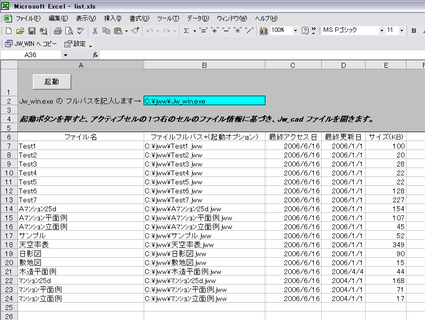
各ルートドライブ内のフォルダから拡張子jwwのファイルを検索しlist.xls（エクセルファイル）に出力します。
JWW5.01から新たに追加された機能「起動オプション機能」の使用を想定しています。

「jFile for JWW」は、金桜さんのスプリクトに加えて「list.xls」マクロを使用したエクセルファイルを使っています。
この「list.xls」は、<a href="http://homepage2.nifty.com/christchurch/" target="_blank">kazuさん</a>　と　<a href="http://sweep-jp.com/mameg/" target="_blank">金公さん</a>　の合作「sample_金公作.xls」(スペース対応版)より提供して頂いてます。
ありがとうございます。
<a href="http://www.tmk-s.com/gaihen/img/jFile.html" onclick="window.open('http://www.tmk-s.com/gaihen/img/jFile.html','popup','width=852,height=642,scrollbars=no,resizable=no,toolbar=no,directories=no,location=no,menubar=no,status=no,left=0,top=0'); return false"><img src="http://www.tmk-s.com/gaihen/img/jFile-thumb.png" width="425" height="320" alt="" /></a>

「起動オプション機能」新たに加わった機能なのですが、どんな使い方をするか？私も現在模索中です。
この「jFile」を研究資料に、皆さんのご意見を聞かせて頂ければ良いかなと思いアップさせて頂きます。

<a href="http://www.tmk-s.com/gaihen/dl.html">ダウンロードのページ</a>にアップしましたのでよろしくお願いします。

]]>
        
    </content>
</entry>
<entry>
    <title>xBL3D </title>
    <link rel="alternate" type="text/html" href="http://www.tmk-s.com/gaihen/2006/06/xbl3d.html" />
    <link rel="service.edit" type="application/atom+xml" href="http://www.tmk-s.com/blog/mt/mt-atom.cgi/weblog/blog_id=4/entry_id=211" title="xBL3D " />
    <id>tag:www.tmk-s.com,2006:/gaihen//4.211</id>
    
    <published>2006-06-18T22:03:38Z</published>
    <updated>2006-06-18T22:25:11Z</updated>
    
    <summary>ここから生まれた「xBLOCK」を使った新たな発展系エクセルブックで　MASA　...</summary>
    <author>
        <name>marusan</name>
        
    </author>
            <category term="020外変紹介" />
    
    <content type="html" xml:lang="ja" xml:base="http://www.tmk-s.com/gaihen/">
        <![CDATA[ここから生まれた「xBLOCK」を使った新たな発展系エクセルブックで　MASA　さんが公開されました。

<blockquote>　　xBL3D 
JW_CAD for Windowsから外変xBLOCKを利用して、 XYZ座標を取り込んで、３Dファイルを出すxBLOCK発展系エクセルブックです。
オマケに型枠面積わかるようにしました。</blockquote>

残念ながら、私は３Ｄファイルを取り扱うような経験が少なく、どのような物なのか感覚がつかめません。(^_^;)
興味の有る方、是非ダウンロードして使用感をＭＡＳＡさんの所へコメントしましょう。

　　<a href="http://www.geocities.jp/me109e4jp/" target="_blank">⇒ HowBank　MASAさんのサイト</a>
]]>
        
    </content>
</entry>
<entry>
    <title>BATファイルの編集</title>
    <link rel="alternate" type="text/html" href="http://www.tmk-s.com/gaihen/2006/06/bat_2.html" />
    <link rel="service.edit" type="application/atom+xml" href="http://www.tmk-s.com/blog/mt/mt-atom.cgi/weblog/blog_id=4/entry_id=210" title="BATファイルの編集" />
    <id>tag:www.tmk-s.com,2006:/gaihen//4.210</id>
    
    <published>2006-06-17T05:23:56Z</published>
    <updated>2006-06-17T10:16:13Z</updated>
    
    <summary>久々？　の　表題の　「外部変形を考える」　ネタ。 バッチファイルの編集（書換え）...</summary>
    <author>
        <name>marusan</name>
        
    </author>
            <category term="028マメヒント" />
    
    <content type="html" xml:lang="ja" xml:base="http://www.tmk-s.com/gaihen/">
        <![CDATA[久々？　の　表題の　「外部変形を考える」　ネタ。

バッチファイルの編集（書換え）を考えてみます。(^_^;)
右⇒「ContentsMenu」にもBATファイルの書換え例を載せてますが、今回の題材は6/16にアップした<a href="http://www.tmk-s.com/gaihen/dl.html">「レイヤカラー値.lzh」</a>です。]]>
        <![CDATA[この外部変形の実行バッチは、スターさんからの提供です。
また、メインの項目選択のバッチは、siegelさんからの提供です。
各々、個別で記述していただいたBATを私が少しアレンジして纏めて説明書を添付して「レイヤカラー値.lzh」としてアップした訳です。

　　　ので・・・ここで、BATの編集の紹介をしてもスターさんやsiegelさん、怒らないですよね？
　　　ね？　ね？　（ _ _ ）...o失礼しました。


<strong>---レイヤカラー値_Main.bat　の編集---</strong>

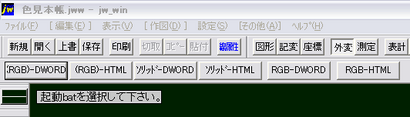
レイヤカラー値_Main.batを選択すると次のような項目選択になります。
<a href="http://www.tmk-s.com/gaihen/img/li01.html" onclick="window.open('http://www.tmk-s.com/gaihen/img/li01.html','popup','width=532,height=152,scrollbars=no,resizable=no,toolbar=no,directories=no,location=no,menubar=no,status=no,left=0,top=0'); return false"><img src="http://www.tmk-s.com/gaihen/img/li01-thumb.png" width="410" height="117" alt="" /></a>

添付されている「レイヤカラー値説明書.txt」を読んでもらえれば分かると思いますが
３番目４番目の【ｿﾘｯﾄﾞ-DWORD】と【ｿﾘｯﾄﾞ-HTML】は、JWWの作図画面に書かれたソリッド図形選択でレイヤ名にDWORD書式若しくはHTML書式で記述します。
ソリッド図形は、任意色で作図されたものが対象です。

１番目２番目の【(RGB)-DWORD】と【(RGB)-HTML】は、　RGB　が括弧（　　）で括られています。
JWW作図画面に書かれたRGB書式の文字列を選択する訳ですが、この文字列が括弧で括られている事が必要になります。
たとえば、白色を示すRGB書式では　（255.255.255）　と括弧で括ります。
これは、スターさん作の「ソリッド色見本」を参考に考えられています。
　　　<a href="http://forum.nifty.com/farchi/download/cad_data/jw/solid_iro.htm" target="_blank">⇒スターさん作のソリッド色見本</a>

しか～し、もう一つご紹介しているＯＪ工房さん作の「JWW塗料標準色見本帳」は、RGB書式の記述が括弧で括られていません。
そこで、括弧が付いていない　255,255,255　という文字列に対応したのが５番目６番目の【RGB-DWORD】と【RGB-HTML】です。
　　　<a href="http://www.vector.co.jp/soft/win95/business/se331664.html" target="_blank">⇒ＯＪ工房さん作のJWW塗料標準色見本帳</a>

<strong>--追記--</strong>
RGB書式の文字列は、スターさん作の「ソリッド色見本」、ＯＪ工房さん作のJWW塗料標準色見本帳の記述を対象にしています。
（255.255.255）の括弧は半角「 . 」は（ドット、ピリオド）です。
255,255,255の「 , 」は（コンマ）です。


　　　　　　　　<strong>前置きの説明が長くなりました。(^^ゞ</strong>

<blockquote>使ってみたんだが・・レイヤカラー値_Main.batを選択した時の項目を自分が使い易いように・・
こんなに沢山の項目はいらないよ。これとぉ・・これだけ有れば良いんだよ。</blockquote>

<em>・・・と、正直な話・・σ(^^；)の悪友（飲み仲間）から早速の問合せが有りました。(^^ゞ。。。</em>


そこで、「レイヤカラー値_Main.bat」の編集を紹介しておきます。

エクスプローラーで、レイヤカラー値_Main.batを右クリック－＞編集をクリックするとメモ帳が展開します。
その中身は、以下のようになっています。
<div class="infoblog">------------------------------------------------------
@REM ﾚｲﾔｶﾗｰ値ﾒｲﾝﾒﾆｭｰBAT
@echo off
goto end
REM #jw
REM #cd
REM #hc 起動batを選択して下さい｡
REM #hm |(RGB)-DWORD|(RGB)-HTML|ｿﾘｯﾄﾞ-DWORD|ｿﾘｯﾄﾞ-HTML|RGB-DWORD|RGB-HTML|

REM #:1
REM #h/BAT/RGB-DWORD.bat
REM #e

REM #:2
REM #h/BAT/RGB-HTML.bat
REM #e

REM #:3
REM #h/BAT/SOLID-DWORD.bat
REM #e

REM #:4
REM #h/BAT/SOLID-HTML.bat
REM #e

REM #:5
REM #h/BAT/RGB-DWORD2.bat
REM #e

REM #:6
REM #h/BAT/RGB-HTML2.bat
REM #e

:end
echo #>jwc_temp.txt
------------------------------------------------------</div>

<font color=#0080ff>たとえば、・・「俺は、HTML書式で記すものしか使わないよ。」というのであれば・・・</font>

REM #hm |(RGB)-DWORD|(RGB)-HTML|ｿﾘｯﾄﾞ-DWORD|ｿﾘｯﾄﾞ-HTML|RGB-DWORD|RGB-HTML|

　　　　　　－－－－－の記述を　↓　－－－－－

REM #hm |(RGB)-HTML|ｿﾘｯﾄﾞ-HTML|RGB-HTML|

と書き換えて、参照ラベル用指定を１～３にして、それぞれのREM #h/　の後に対応したbatファイルを記述する。

<div class="infoblog">-----------------変更後はこうなります--------------------

@REM ﾚｲﾔｶﾗｰ値ﾒｲﾝﾒﾆｭｰBAT
@echo off
goto end
REM #jw
REM #cd
REM #hc 起動batを選択して下さい｡
<font color=#ff0000>REM #hm |(RGB)-HTML|ｿﾘｯﾄﾞ-HTML|RGB-HTML|

REM #:1
REM #h/BAT/RGB-HTML.bat
REM #e

REM #:2
REM #h/BAT/SOLID-HTML.bat
REM #e

REM #:3
REM #h/BAT/RGB-HTML2.bat
REM #e</font>

:end
echo #>jwc_temp.txt
------------------------------------------------------</div>

<font color=#ff0000>赤色</font>部分が変更した箇所です。
お解りですよね？　不明な点は、掲示板へ書き込んで下さい。m(__)m

BATフォルダの中に有るバッチファイルは、不必要な物は、移動してもらっても良いですし、残して置いても問題ありません。
自分に合った環境で、使いやすいように編集してみて下さい。


－－－－※ 注意！！－－－－
<blockquote>■その他
　　　このプログラムは「外部変形を考える」の研究資料です。
　　　転載・配布の場合は、このテキストも一緒にこのままの形でお願いします。</blockquote>

と、「レイヤカラー値説明書.txt」に書かれています。ご理解をお願い致します。]]>
    </content>
</entry>
<entry>
    <title>レイヤカラー値アップ</title>
    <link rel="alternate" type="text/html" href="http://www.tmk-s.com/gaihen/2006/06/post_16.html" />
    <link rel="service.edit" type="application/atom+xml" href="http://www.tmk-s.com/blog/mt/mt-atom.cgi/weblog/blog_id=4/entry_id=209" title="レイヤカラー値アップ" />
    <id>tag:www.tmk-s.com,2006:/gaihen//4.209</id>
    
    <published>2006-06-16T11:40:19Z</published>
    <updated>2006-06-18T23:09:43Z</updated>
    
    <summary>下↓　6/14「JWW5.01の新機能」の記事でJWW5.01の新機能について書...</summary>
    <author>
        <name>marusan</name>
        
    </author>
            <category term="020外変紹介" />
    
    <content type="html" xml:lang="ja" xml:base="http://www.tmk-s.com/gaihen/">
        <![CDATA[下↓　<a href="http://www.tmk-s.com/gaihen/2006/06/jww501.html">6/14「JWW5.01の新機能」</a>の記事でJWW5.01の新機能について書きましたが、それに付いてsiegelさん、スターさんから有用なバッチファイルを提供して頂きました。
お二方から承諾を頂きましたので、「レイヤカラー値.lzh」として正式にアップしました。

JWW5.01から新しく追加された機能『印刷時のレイヤ内の図形の塗潰し機能』でレイヤ名に任意色を記述するための補助作業を行うバッチファイルです。
作図画面上に書かれているRGB書式（255.255.255）やソリッド図形を選択すると書込みレイヤにDWORD書式（16777215）若しくはHTML書式（#ffffff）でレイヤ名を記述します。

ダウンロードされた中に添付されている「レイヤカラー値説明書.txt」を参照して下さい。

<a href="http://www.tmk-s.com/gaihen/dl.html">「DownLoad コーナー」</a>からダウンロード出来ます。

]]>
        
    </content>
</entry>

</feed>